I started to experiment more and more with the use of textures and overlays when it comes to working on different photos. Got to tell ya' totally loving the results. I have started to experiment with making some of my own and with different brushes to get different looks and or effects. Watching several Youtube videos and reading different things on how some like to use them. Here are a few examples with before and after.
Textures and overlays help enhance an image or help you get closer to the look that you want to achieve.I used several textures which I made on this image. I was going for a slightly vintage painted effect and the filters with some textures that I removed from some areas using a watercolor brush tweeked to my liking really helped.
The best thing I found was to experiment with different blending modes with textures as well as opacities. Add a mask and paint them off or on the image. Play around with brush opacity as well. It takes some getting used to and trial and error but it is through trial and error you will most likely find the result that you like. Each time I tested another filter I would duplicate my original image and create a mask. Painting off the effect on certain areas. I would increase contrast or saturate the colors where needed and desaturate them in other parts of the photo.
Some filters to mess around with would be paint daubs, watercolor and find edges. The above before image is without any adjustments. Before starting with the "painted" effect I did some basic editing. Reduced noise, sharpened, used a level adjustments layer to give it a bit more pop. Then I played with the hue/saturation adjustment layer among others to exaggerate the colors a bit more to help with the painted effect. The beauty of working with layers, masks, and adjustment layers? That you could go back and make changes till you felt happy with the final result.
This next one is with basic edits (sharpening, noise reduction, etc..)
This is with one textured overlay that I made and filters within photoshop.
For the above I followed along with this video on another image and then changed it up to make the end result a bit different and in a sense my own. A great video just to get familiar with some of the basics!
You are sure to find something that you will like. A texture as you can see in my two examples can be used as a background or as an element to alter the entire image. My first example I used several textures some rotated some flipped around to get the look I wanted. Textures MADE the image. While in the 2nd example the texture was used to add depth to the blues and masked out on certain parts using different opacity watercolor brushes.
Can you recover deleted images from the SD card? What about a computer or laptop? This method can work for recovering deleted files of any sort. Just make a selection that reflects what you are looking for in step 3.
Well this depends on a variety of things. If you noticed that a file you wanted was missing after months of using your computer/laptop and are unsure WHEN the file got deleted.. chances of recovery are slim.
When a file gets deleted there is a pretty good chance of being able to get it back. However, each time you save a file or save changes to files, installing and uninstalling programs that chance goes down. When you make changes like that you essentially are writing over the space that your file once occupied if that makes sense. Same with SD cards. If you took a bunch of photos and deleted them by accident (or your child went keyboard ninja and deleted them for you when you were transferring them to your hard drive) you still have a pretty good chance of recovering your files.
Download and install Recuva from here (you only need the free version): Click Here
When you open it, the program should open a wizard.
Click next in the wizard, then click on pictures.
Click on next again.
On the next screen choose the location you want to search for the files.
Click on next again and then it will look for the files.
SAVE the files found on an external drive, or flash drive. Unfortunately if it does not find anything it means the photos are gone. I have had edited photos deleted by my son and I was unable to recover them but Recuva recovered the UNEDITED photos for me. So it all boils down to how soon you noticed the problem.
Ghosting is when one of two photos becomes semi-transparent when working on them in Photoshop. This can happen when working on a composite image and where masks are involved. The in camera ghosting is another issue. There could be a variety of reasons why this may occur and mostly they are from a mis-click. If you are not using a layer mask and have this issue then you will not find a solution here sorry. Here are some things to check to remedy the issue.
If you have something somewhat
similar to this then it is an easy fix.
Check that the blending mode is on normal. Also make sure you have the mask thumbnail selected when you are painting on your mask.
Check that Fill is at 100%.
Make sure that you have Opacity at 100%.
The most common problem is that your brush is not completely black! Simply click on the white/black squares to reset your foreground and background colors to black and white.
These are some of the top informational sources for almost any topic. You don't have to be a student or a teacher to enjoy checking out some of these great sites. If you have any that you think are a must add comment and I will check them out and add them :)
Informational Sites
InfoPlease "Research our extensive archive of more than 28 million documents from 2,600 sources."
This is a search engine of sorts but much better than Google. I found it to return better results with less "junk" results. Which is important when strapped for time and not wanting to weed through the internet rubbish pile. Makes the rubbish pile significantly smaller in my view!
FreeDocumentaries.org
Need something to add to your knowledge about a particular topic? This is a great way. Especially if you are a visual/auditory learner. Also a great resource for teachers. Since these ARE films you would benefit exceptionally from having a fast internet connection.
Findlaw.com
A well organized site about many legal matters and has other parts of the site designed for legal pros, students or anyone else for that matter.
Top Online Directories WorldYellowPages
How great is this? The yellowpages... for the world. It might come in handy if you are overseas and have access to a computer and need to find services.
TravLang
Travel and Language Services. This site has a language translator as well, real nifty.
AlphaDictionary
The time of looking up topics in an encyclopedia has pretty much become tedious especially with the advent of the internet. Now, use the internet to search 1065 Online English Dictionaries all at once for the word you are looking for.
A little upbeat encouragement to keep learning..!
Language Arts Resources
Bartleby.com
Bartleby is a reference resource where you can find a vast array of information on classics of reference, literature and nonfiction. I used this site extensively for my Literature classes and writing classes. I found it to be a valuable resource that I certainly couldn't do without.
OWL: Online Writing Lab
Online writing lab from Purdue University with extensive resources for writing, grammar and punctuation. Explanation of various grammar rules and exercises to check your knowledge.
Grammar Bytes!
This certainly is grammar instruction with an attitude. You could look up several different grammar rules, check out exercises, and even can download presentations and handouts! Real nifty for teachers as well.
Better Medicine
With articles on various health related topics, symptom checker and a dedicated section for children illnesses and parenting advice this site seemingly has it all. I liked the drugs and treatments part of the site-- now I figured out what these medicines forgotten in a drawer are now for.
School Psychology Resources
Research learning disabilities, ADHD, functional behavioral assessment, autism, adolescence, parenting, psychological assessment, special education, mental retardation, mental health, and more.
Scholarly Psychology Resources On the Web
Offers links to scholarly information about various topics in psychology (statistics as well). A great resource for psychology majors.
WebMD
This site is much like a medical book but with a search engine. You even could go to a certain part of the site and input what symptoms you have and you'll get a list of diagnosis related to those symptoms. This in no way means you shouldn't go to a doctor. Just it is a great resource to learn more about how to keep ourselves healthy and more about anything medical related.
Educational Sites: Various Areas of Study
The following sites are useful not just for students but also for those who want to brush up on certain topics:
Dummies.com
Here you find a wealth of information on almost any topic. Even has a test prep section which is rather useful.
Math.com
A site I used a lot when I had trouble with an equation. A great study tool, or review for those of us who are mathematically challenged.
IPL.org (Internet Public Library)
A public library of sorts at your finger tips. Links to some of the best sources on the internet by category, newspapers and magazines, kids, teens, and special collections made by IPL.org. Find sources to study guides or the latest child friendly sites.
Business Administration Resources (CSUF Library)
A Pollak Library Research Guide to Business Resources.
The CSUF library has a wealth of resources for your business research needs including books, articles, indexes and recommended web sites. Here you will find Library & research resources for every area of business.
Kids National Geographic
A safe place for children to learn and explore about different people, animals, and places. Plenty of games, videos and activities.
Dr. Suess | Suessville
Official site of Dr. Seuss and the Cat in the Hat featuring games, printable activities, the complete illustrated character guide, information about creator Theodor Geisel and his books for kids, parent and teacher resources, and a photo gallery of his artwork.
AskKids.Com
A kid friendly search engine for kids to use when they need to look up anything for a class assignment. FactMonster.Com
Fact Monster is a free reference site for students, teachers, and parents. Students can get help on their homework, or find information on thousands of subjects such as history, biography, sports, health, math and much more.
Kids Corner
A great resource for kids about all things animals! Animal information, games and more!
First of all what is Squidoo? Think of it as being a ever growing database of information. Made by people on a variety of topics. With Squidoo's high expectations of those who write you can be sure your chances of finding useless ad infused content in limited quantities. Those that do escape don't last for long. It is free to sign up and best part is you earn by writing about topics that concern you. The more personal the content the more likely it is you will succeed on Squidoo. First of all if you don't have an account start your free account HERE.
Now one of the major things to know is unlike a blog where you simply type and click a few things you will have to know some HTML coding. Squidoo seems to strip table codes when they are saved. So all you get is a mess not a neat table. That was my issue-- getting tables to show up correctly. I used them mainly for images. First of all upload your images somewhere (if they aren't already online) so that you have an image URL (right click your image in the browser click copy image location).
These two pages here made things a heck lot easier for me. This first one is for generating tables for myspace but it worked out fine for me. FreeCodeSource.Com Table Generator Make the table to your specifications... click edit and enter the coding for a linkable image (minus the space before a and img. < a href="YOUR LINK HERE">< img src="IMAGE SOURCE HERE" width="32" height="32">
Do the above minus the spaces. A href is what will make your image clickable. Now write/edit this same code for every image that you want to link somewhere and copy/paste it into the EDIT box.
After this you should get a table to your liking. Be sure to click update table when you are done. Select the code and open a new tab open:Table Generator for Squidoo Lenses
Under select data format click "HTML
code block" and paste your code. Under table style select none, header, left. You can select what you want to achieve the result you need. However, this is what gave me the best result. Click get HTML code. IF like me you get a bluish type gap between the images and don't want it there do the following.
On your SQUIDOO lens paste the code you ended up with and see the result. In order to change it to your liking simply change this code (again minus the space in the beginning: < p style="float:left;width:290px;background:#ddf;margin:0 -1px -1px 0;padding:1px">
See that 290px? Reduce that number to 230 (for example). Save and see what you get. Continue gradually reducing it till the "gap" is gone.
This looks daunting.. but with a bit of patience the result is well worth it. People use clickable images on squidoo to link to their products, or a related website. I hope you found this informative.
There is no shortage of educational apps in the English language, quality ones are different story but eventually you'll find them. However, hit up a search for educational Arabic apps for children and you hit a wall. Don't get me wrong there are apps but many of them don't offer any educational value, you need to purchase, or in simply aren't so great. Either the kids don't like them or parent's find them seriously lacking. Here are some of my son's faves that I hope you will like for your own little guy or girl as well.
Here you'll find a list of the top educational Arabic apps for childrenon both Android and Apple devices. Some are limited to android or Apple products, while others are available for both.
Kalemat Wa Haroof - Apple Kalemat Wa Haroof - Android
Sweet and simple yet offering kids fun while learning the alphabet. HashAppsltd make a variety of other apps for children to enjoy, many worth checking out on the apple store. Some of apps from the apple store might be released for android.
Animals with Tareq wa Shireen
In the lite (free) version the app is limited, however even so the two
free songs and free game and learning part of the app are sufficient
enough to let toddlers enjoy this app. My son keeps playing the songs
over and over bobbing his head to the beat. This app is the exception on this blog the only one that I did post that was only for Apple products simply because how great it is.
Ashkal Wa Alwan - Android Ashkal Wa Alwan - Apple:
Learning colors and shapes just got a whole lot easier for your little ones. What is great about this app is that it not only shows the shape, it shows items from the real world that would be the same shape.
Abjad - Android Abjad - Apple:
This app is great for teaching letters for the slightly older kids since it has features such as word search for the slightly older Arabic learner. An added plus is the alphabet song that kids can tap on to listen to.
My childhood was awesome without apps but with my old Nintendo game system where HD meant you might be able to differentiate eyes and wireless meant less wires but not without them. For a blast to the past when it comes to Arabic children songs check out my page: Arabic Children Songs: Flash From The Past
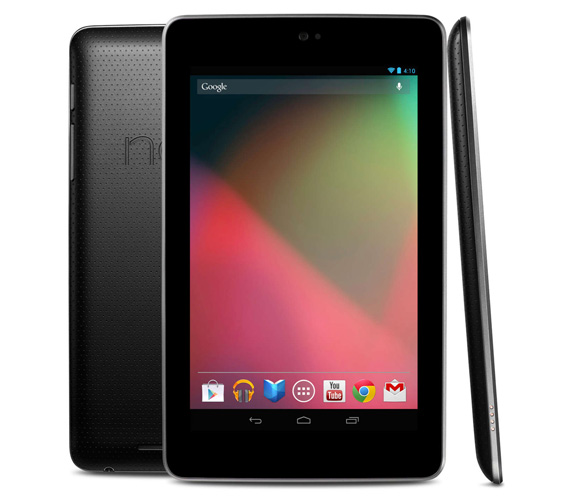
Has your Nexus 7 suddenly refuse to turn on? Even when you have it connected to a charger still no response? The only signs of life is a faint bluish-black glow that gives you slight hope that you MIGHT be able to fix this issue.
In most cases it simply is that the battery was completely drained. So completely drained that it won't even start up. The solution is rather simple, connect it to the charger and don't touch it. Mine took almost 2 days! First day barely responsive mid-day on the 2nd day I was able to turn it on but kept it on the charger till it fully charged. This seems to be an issue with many Nexus 7 users that when the battery completely drains unlike other devices it will NOT turn on when connected to a power source.
Make sure to use the original charger that came with your Nexus 7. If you don't you might not get enough power to your device since traditional phone chargers don't disperse enough power.
If this fails then you can try this tip to fix the issue:
When the battery is fully discharged the N7 will go into a sort of safe charging mode. After leaving it on the charger for 3 - 6 hours try holding the power button for up to 30 seconds, this should wake your N7 up.
The last option to try would be to hold the power button and the +/- volume buttons for 30 seconds. This should reset the device.
It doesn't matter the weather people simply want to find ways to have a good time without spending crazy amounts of money. In Chicago for example there are ways to have fun for little to no money. If you are going downtown keep in mind it usually is simply cheaper to take public transportation. When you factor in gas, and parking costs the convenience eats a hole into your pocket before you even get to your destination. Only in the case where 6 or more people are going does taking the family van cost less. Here are some family friendly destinations.
Things to do places to see: (check out Fun In Chicago - for admission prices, tips, videos and details about the following places)
Navy Pier - There are both free and admission based things to check out on your visit. The Glass Museum is free but the IMAX theater isn't.
Willis Tower (A.K.A. Sears Tower) - Check out the view and get dizzy looking down... yikes.
Lincoln Park Zoo - Since this is in downtown chicago you can start your day here and end your day anywhere else.
Hancock Observatory - Check out the sights and another great skyscraper. You aren't as high up as you would be in the Willis Tower but still a great view.
Buckingham Fountain - A tip start off from Michigan Ave. The walk there is well worth it. If you have small children with you they might tire easily so figure out what is best for you and those you are with.
Some tips:
Plan your trip in advance. If you are going to the zoo know if you'll be packing a picnic or eating out. If you are eating out find a restaurant online that is close so you won't let your rumbling stomach lead the way.
If you are going with a large group of friends some places offer group discounts, check it out it could save you some money.
Check the weather forecast, nothing worse than being out in the open on a particularly blistering hot day or getting caught in a bad rainstorm.
Take your water with you. Buying a bottle of water at Navy Pier for example costs over $3 in some areas of the Pier. That adds up with little kids who tend to get thirsty. Remember to fill up at drinking fountains.
If you intend on taking your credit card with you make sure it is accepted at that location. Since I last checked Discover was not a credit card that was accepted at Navy Pier. Avoid awkwardness and check it out first either by calling or hitting up the internet for answers.
With tablets like the Nexus 7 coming out at a reasonably low
price (lower if you hunt on E-Bay), parents are starting to see the
educational potential during game play now more than ever before. With
my multiple downloads of trying to find a GOOD app for my son I have
found a few gems along the way. First thing's first... make your tablet a
child safe zone with a few taps with the first app on the list.
1) Kid Mode: Free Games and Lock - Android. Also for iPhone, iPad, and iPod touch... read note.
All of your child's favorite apps will be in one place in a child friendly environment. With the child lock feature kids stay within the app and can not make in-app purchases, click adds, or otherwise mess with your settings. It has a very easy setup. No accidental phone calls or deletion of your apps or other items. My favorite is locking the MAX volume you want to allow... which keeps both parent and child happy. NOTE: I tried this with Nexus 7 and was very happy same can not be said with iPhone. On the iPhone 4s I was unable to ADD apps to the allow list so my son only had access to the children's videos and drawing app that is built into Kid Mode. If anyone finds a good alternative for iPhone please comment and I'll add it to this list.
2)Doodle Toy: Kids Draw Paint - Android.
Let your child's creative juices flow with this app. They drag their fingers across a screen and random sounds play as glowing lines, embossed, and so on appear. They can adjust how the line looks as well as different colors and effects with a simple tap. You might find yourself wanting to doodle just as much as your little one. Android only.
4) Rainbow Cars! Kids Colors Game - Android. Rainbow Cars! Kids Colors Game - Apple Store.
A great app with many activities, one of my son's favorite games. I was very happy to find it on the Android Market. I first installed this on my husband's phone for our son so when I got my Nexus 7 it was one of the first apps I looked for. Children learn colors, critical thinking and counting through puzzles, memory games, piano, coloring pages, object hunt and more.
"...Teaches letter sounds and the basics of blending, but
does not
teach the next step, which is fluency in actual reading.."
Kids learn to recognize letters through repetition and mini games. Android only.
6) Toddler Kids Puzzles Puzzingo - Android. Toddler Kids Puzzles Puzzingo - Apple Store.
This app is full of interactivity, puzzles, and colorful graphics which is sure to grab the attention of toddlers. Concepts such as shapes, colors, numbers, and alphabet are covered. With great topics such as animals, cars, bugs, space and more children are sure to stay entertained. My toddler nicknamed my Nexus 7 "Puzzingo" when he wants to use it simply because he loves this app.
7) Thomas and Friends.
If your toddler loves trains then this is a must. Unfortunately this is only available in the app store. Which is a bummer for my little guy. With matching, coloring, and video clips this app gives your toddler quite a few things to do.
8) Math Evolve LITE - Android Math Evolve LITE - Apple Store
Available for both Android and Apple devices this is one of the BEST math apps out there. A bit more advanced for young toddlers but still loads of fun. This is the FREE version the full paid version has much more to offer.
9) 1+1 Math For Kids Yet another great math app for kids, as far as I know this one is iPhone (Apple Store) only. Teaches math by repetition simple yet color for graphics. Easy to use for small hands and learning minds. The fact that there are no spoken words makes this a great app no matter what language you and your child speak.
10) Cut The Rope - Android Cut The Rope - Apple Store
This can keep your child occupied... for a VERY long time. Children develop critical thinking and problem solving as levels progress. Things like pulleys, bubbles and catapults are used to get the cookie/candy to the cute monster named Nom.
This list will be updated as I find new apps or as others are recommended.I know there are many more apps out there that kids love. My aim is educational as well as free.
One of the first few things people who check out is either the games or reading selections when browsing around in the Play Store. Here are some apps that will keep help you enjoy as well as take full advantage of your new gadget.
1. AVG Anti-virus - What I like about this app is that it also has a sort of theft protection/anti-theft protection side to it as well.
2. Mozila FireFox Browser - If you're a fan of the browser when using your laptop then this is a no brainer.
3. Tango - A great app that makes communicating with friends and family that are miles away so much easier. Having a decent Wi-Fi connection doesn't hurt either. Users can make free voice, and video calls. You can send text messages and leave video mail. I was able to install this on my Nexus 7 without too much hassle. However whoever you want to talk to must have the app installed as well. I was also able to install it on my laptop using the same number and email address which made things much simpler.
4. AndroXplorer - A very user friendly file manager for android users. View your files, delete and move them with relative ease.
5. Permission Friendly - One of the things people seem to overlook is just how MANY permissions they are allowing an app to have. I deleted many apps after seeing that I gave them the OK to use my camera, and microphone when the app didn't require them to function. A real eye opener and helps you be in more control of your privacy.
6. Flashlight - Very simple app that turns your screen into a VERY bright white screen as well as uses your device's camera flash if that is what you want.
7. Maven Player - Great player that is easy to use and a sweet look and feel. Put your songs into a playlist, or play them by artist or album.
8. Wattpad - If you don't want to enter any credit information to have access to some of the free books available on the app store then look no further. Some of the books are not so great but you are sure to find some gems. I found many of Shakespeare's works here.
9. FilterScreen - If you like to read on your device then this is a must have. It allows you to dim the screen more than the lowest setting on your device. With one tap dim your screen to a pre-set level, and another to go back to your previous brightness level.
10. Easy Uninstaller - Lets users see all their apps easily and allows for batch uninstall. View apps by most recent, in alphabetical order, or file size.
11. Clean Master - Helps users clean out junk files and reclaim precious space.
13. Norton Spot ad detector - Want to know what app is spamming your device and installing shortcuts/apps without your consent? This app scans your device to help identify the culprit so you can take back control.
14. Kingsoft Office - One of the few good ones there. Allows you to open documents that Microsoft Office would, create, save and edit existing files.
15. NTC: Nike Training Club - The best all in one training app. Offers detailed instructions on over 114 workouts.
16. Infnite Painter - I installed many drawing/sketching apps but ended up uninstalling them due to their lacking in one way or another. With layers, and multiple brushes that you can customize and much more. Hands down this is the best app out there for FREE for drawing.
Well these are the ones that I found to be the best, with the least intrusive ads, and reasonable permission requests.

.jpg)
.jpg)