There is no shortage of educational apps in the English language, quality ones are different story but eventually you'll find them. However, hit up a search for educational Arabic apps for children and you hit a wall. Don't get me wrong there are apps but many of them don't offer any educational value, you need to purchase, or in simply aren't so great. Either the kids don't like them or parent's find them seriously lacking. Here are some of my son's faves that I hope you will like for your own little guy or girl as well.
Here you'll find a list of the top educational Arabic apps for children on both Android and Apple devices. Some are limited to android or Apple products, while others are available for both.
Kalemat Wa Haroof - Apple
Kalemat Wa Haroof - Android
Sweet and simple yet offering kids fun while learning the alphabet. HashAppsltd make a variety of other apps for children to enjoy, many worth checking out on the apple store. Some of apps from the apple store might be released for android.
Animals with Tareq wa Shireen
In the lite (free) version the app is limited, however even so the two
free songs and free game and learning part of the app are sufficient
enough to let toddlers enjoy this app. My son keeps playing the songs
over and over bobbing his head to the beat. This app is the exception on this blog the only one that I did post that was only for Apple products simply because how great it is.
Al Salwa Books and Media Plus story App Ay Shay - Apple
Al Salwa Books and Media Plus Story App Ay Shay - Android:
Ay Shay "Anything" is a storybook app where two children spend their day playing while their mother is out shopping. This is based on a real book under the same title. Interactive animations make this book come to life and the mini games give something little kids to come back to.
Ashkal Wa Alwan - Android
Ashkal Wa Alwan - Apple:
Learning colors and shapes just got a whole lot easier for your little ones. What is great about this app is that it not only shows the shape, it shows items from the real world that would be the same shape.
Abjad - Android
Abjad - Apple:
This app is great for teaching letters for the slightly older kids since it has features such as word search for the slightly older Arabic learner. An added plus is the alphabet song that kids can tap on to listen to.
My childhood was awesome without apps but with my old Nintendo game system where HD meant you might be able to differentiate eyes and wireless meant less wires but not without them. For a blast to the past when it comes to Arabic children songs check out my page:
Arabic Children Songs: Flash From The Past
Browse
other gifts from
Zazzle.
Monday, March 25, 2013
Monday, March 18, 2013
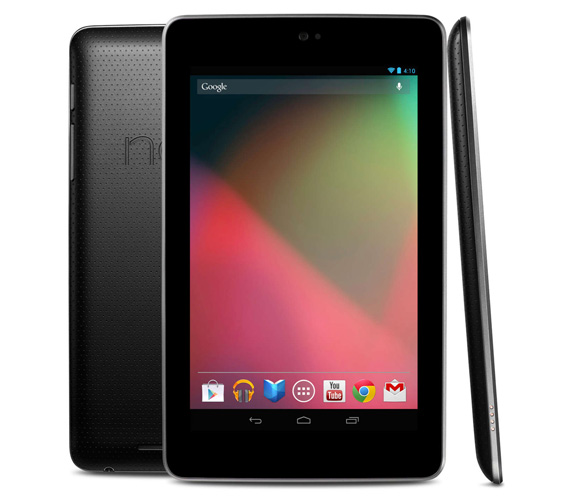
Nexus 7: Turned off but now won't turn back on!
Has your Nexus 7 suddenly refuse to turn on? Even when you have it connected to a charger still no response? The only signs of life is a faint bluish-black glow that gives you slight hope that you MIGHT be able to fix this issue.
In most cases it simply is that the battery was completely drained. So completely drained that it won't even start up. The solution is rather simple, connect it to the charger and don't touch it. Mine took almost 2 days! First day barely responsive mid-day on the 2nd day I was able to turn it on but kept it on the charger till it fully charged. This seems to be an issue with many Nexus 7 users that when the battery completely drains unlike other devices it will NOT turn on when connected to a power source.
Make sure to use the original charger that came with your Nexus 7. If you don't you might not get enough power to your device since traditional phone chargers don't disperse enough power.
If this fails then you can try this tip to fix the issue:
When the battery is fully discharged the N7 will go into a sort of safe charging mode. After leaving it on the charger for 3 - 6 hours try holding the power button for up to 30 seconds, this should wake your N7 up.
The last option to try would be to hold the power button and the +/- volume buttons for 30 seconds. This should reset the device.
Family Friendly Chicago Fun
It doesn't matter the weather people simply want to find ways to have a good time without spending crazy amounts of money. In Chicago for example there are ways to have fun for little to no money. If you are going downtown keep in mind it usually is simply cheaper to take public transportation. When you factor in gas, and parking costs the convenience eats a hole into your pocket before you even get to your destination. Only in the case where 6 or more people are going does taking the family van cost less. Here are some family friendly destinations.
Things to do places to see: (check out Fun In Chicago - for admission prices, tips, videos and details about the following places)
Navy Pier - There are both free and admission based things to check out on your visit. The Glass Museum is free but the IMAX theater isn't.
Willis Tower (A.K.A. Sears Tower) - Check out the view and get dizzy looking down... yikes.
Lincoln Park Zoo - Since this is in downtown chicago you can start your day here and end your day anywhere else.
Hancock Observatory - Check out the sights and another great skyscraper. You aren't as high up as you would be in the Willis Tower but still a great view.
Buckingham Fountain - A tip start off from Michigan Ave. The walk there is well worth it. If you have small children with you they might tire easily so figure out what is best for you and those you are with.
Some tips:
Things to do places to see: (check out Fun In Chicago - for admission prices, tips, videos and details about the following places)
Navy Pier - There are both free and admission based things to check out on your visit. The Glass Museum is free but the IMAX theater isn't.
Willis Tower (A.K.A. Sears Tower) - Check out the view and get dizzy looking down... yikes.
Lincoln Park Zoo - Since this is in downtown chicago you can start your day here and end your day anywhere else.
Hancock Observatory - Check out the sights and another great skyscraper. You aren't as high up as you would be in the Willis Tower but still a great view.
Buckingham Fountain - A tip start off from Michigan Ave. The walk there is well worth it. If you have small children with you they might tire easily so figure out what is best for you and those you are with.
Some tips:
- Plan your trip in advance. If you are going to the zoo know if you'll be packing a picnic or eating out. If you are eating out find a restaurant online that is close so you won't let your rumbling stomach lead the way.
- If you are going with a large group of friends some places offer group discounts, check it out it could save you some money.
- Check the weather forecast, nothing worse than being out in the open on a particularly blistering hot day or getting caught in a bad rainstorm.
- Take your water with you. Buying a bottle of water at Navy Pier for example costs over $3 in some areas of the Pier. That adds up with little kids who tend to get thirsty. Remember to fill up at drinking fountains.
- If you intend on taking your credit card with you make sure it is accepted at that location. Since I last checked Discover was not a credit card that was accepted at Navy Pier. Avoid awkwardness and check it out first either by calling or hitting up the internet for answers.
Top Educational Children Apps
With tablets like the Nexus 7 coming out at a reasonably low
price (lower if you hunt on E-Bay), parents are starting to see the
educational potential during game play now more than ever before. With
my multiple downloads of trying to find a GOOD app for my son I have
found a few gems along the way. First thing's first... make your tablet a
child safe zone with a few taps with the first app on the list.
1) Kid Mode: Free Games and Lock - Android.
Also for iPhone, iPad, and iPod touch... read note.
All of your child's favorite apps will be in one place in a child friendly environment. With the child lock feature kids stay within the app and can not make in-app purchases, click adds, or otherwise mess with your settings. It has a very easy setup. No accidental phone calls or deletion of your apps or other items. My favorite is locking the MAX volume you want to allow... which keeps both parent and child happy.
NOTE: I tried this with Nexus 7 and was very happy same can not be said with iPhone. On the iPhone 4s I was unable to ADD apps to the allow list so my son only had access to the children's videos and drawing app that is built into Kid Mode. If anyone finds a good alternative for iPhone please comment and I'll add it to this list.
2) Doodle Toy: Kids Draw Paint - Android.
Let your child's creative juices flow with this app. They drag their fingers across a screen and random sounds play as glowing lines, embossed, and so on appear. They can adjust how the line looks as well as different colors and effects with a simple tap. You might find yourself wanting to doodle just as much as your little one. Android only.
3) Shapes Toddler Preschool - Android
Shapes Toddler Preschool - Apple Store
Teaches shape recognition with voice overs. If your child taps the wrong shape it'll tell them what shape it was and they can try again.
4) Rainbow Cars! Kids Colors Game - Android.
Rainbow Cars! Kids Colors Game - Apple Store.
A great app with many activities, one of my son's favorite games. I was very happy to find it on the Android Market. I first installed this on my husband's phone for our son so when I got my Nexus 7 it was one of the first apps I looked for. Children learn colors, critical thinking and counting through puzzles, memory games, piano, coloring pages, object hunt and more.
5) Kids ABC Phonics LITE.
Teaches children the basics of reading: (from their page)
"...Teaches letter sounds and the basics of blending, but does notKids learn to recognize letters through repetition and mini games. Android only.
teach the next step, which is fluency in actual reading.."
6) Toddler Kids Puzzles Puzzingo - Android.
Toddler Kids Puzzles Puzzingo - Apple Store.
This app is full of interactivity, puzzles, and colorful graphics which is sure to grab the attention of toddlers. Concepts such as shapes, colors, numbers, and alphabet are covered. With great topics such as animals, cars, bugs, space and more children are sure to stay entertained. My toddler nicknamed my Nexus 7 "Puzzingo" when he wants to use it simply because he loves this app.
7) Thomas and Friends.
If your toddler loves trains then this is a must. Unfortunately this is only available in the app store. Which is a bummer for my little guy. With matching, coloring, and video clips this app gives your toddler quite a few things to do.
8) Math Evolve LITE - Android
Math Evolve LITE - Apple Store
Available for both Android and Apple devices this is one of the BEST math apps out there. A bit more advanced for young toddlers but still loads of fun. This is the FREE version the full paid version has much more to offer.
9) 1+1 Math For Kids
Yet another great math app for kids, as far as I know this one is iPhone (Apple Store) only. Teaches math by repetition simple yet color for graphics. Easy to use for small hands and learning minds. The fact that there are no spoken words makes this a great app no matter what language you and your child speak.
10) Cut The Rope - Android
Cut The Rope - Apple Store
This can keep your child occupied... for a VERY long time. Children develop critical thinking and problem solving as levels progress. Things like pulleys, bubbles and catapults are used to get the cookie/candy to the cute monster named Nom.
Want Arabic apps for your children? Check out Arabic Educational Apps For Toddlers.
This list will be updated as I find new apps or as others are recommended. I know there are many more apps out there that kids love. My aim is educational as well as free.
Subscribe to:
Posts (Atom)